Monthly Archives: July 2009

Using Excel to Create Your Game’s Binary Data Files

I don’t think I’ve mentioned it here yet, but I’m currently in the middle of developing a new Blackberry game that I hope to have on App World when I’m complete (as I get closer to completion I’ll put some screen shots up). I’ve always wanted to put an application or game up on one of the mobile stores, not so much to make any significant amount of money (which I won’t), but just to get the program into more people’s hands easily. We’ll see how it goes – but until then, onto the point of this article.

One of the things I ran into on this game (and others) is the need to generate binary files – specifically in this case, level data that dictates where and when objects are in the game, their effects, behaviors, etc. While there is always the option to create a text file to hold this data, this can be problematic in many ways. First, the data you need to store may actually be binary data that doesn’t lend itself to text conversion – also, more handling to read the file (encoding, line feeds, parsing), larger files (which is a concern on devices with little storage like older Blackberrys), and no obfuscation to the end user (which kind of takes the fun out of the game if they can open up this file easily and read where everything is). Binary files are definitely the way to go. And while sometimes it makes sense to make a level editor that will generate the binary files, in some instances you may not have the time or resources to accomplish this. It would be nice to have a tool to generate these files so you don’t have to go hexediting for hours to make a 1K file.

Excel at Creating These Files!

I find Microsoft Excel to be an extremely useful tool in so many situations, especially those where I need to bang out results quickly. Past the normal math, accounting, and analysis capabilities, Excel is awesome for generating files that depend on working with lots of imported data, such as script files and, in our case, binary data files.

In my example, each object had 7 values associated with it. And with some of these values being 2 bytes in size, this came out to 12 or so bytes I would have to enter hex code in with an editor, per object. If I wanted 500 objects, thats 6K of writing hex values. No thanks. It would be much easier to write these values into Excel cells (even auto-generating many of them using Fill-Down with an equation). Then, using VBA (Visual Basic for Applications) that’s built into Excel, dump the contents of the cells out into the binary format I want them in. So let’s see how to do that.

Settings Up Your Sheet

This is the simple part. For this example, I have created a fictional game called “Just Desserts” in which each level consists of a screen filled with desserts and vegetables, and you must eat the various cakes, pies, and puddings but avoid carrots and celery. Our data file that describes each level has 4 values per entry.

Value 1: What level this food is on
Value 2: The ID of this food (E.g. 1=cake, 2=pie, 3=pudding, 4=celery, 5=carrot)
Value 3: X coordinate on screen of this food
Value 4: Y coordinate on the screen of this food

Here’s what an example spreadsheet would look like:
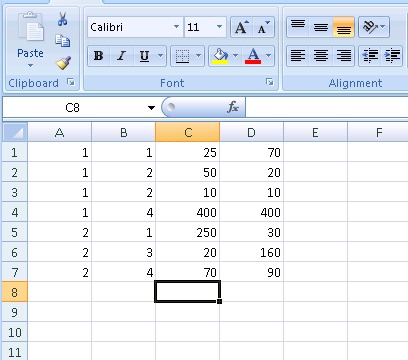
Excel Data

So each row is an object, and each column is one of the values. In our example above, we see on level one we should create a cake at coords (25,70), a pie at (50,20) and another at (10,10), and a celery at (400, 400). On level 2, we should create a cake at coords (250, 30), a pudding at (20,160), and a celery at (70,90). You can manually enter your data in, or use the power of excel and generate the data using a formula – it’s up to you. Once your data is in your spreadsheet, then comes time to turn it into a binary file that can be used by your game.

Macro Time

The power of Excel is increased 10-fold by the ability to include programs in your spreadsheets. Excel uses Visual Basic to accomplish this. By creating a new macro, you can attach a Visual Basic function to it that gets called whenever your macro is. In Excel 2007, Macros are under the View tab. After you create a new one, you are presented with a code editor where you can write your VB function.

Below is the example VB function that would work with the above data and pump it out into a file. Please note – one thing you may run into depending on what language you’re working with, and what architecture, is a little/big endian conflict. VBA pumps out little-endian, but since I was creating a BB game in Java, it expects big endian. I included how to do this inline below, though you could make a function out of it as well.

Sub GenDatFile()

   Dim TempByte as Byte ' Holds 1 byte
   Dim TempInt as Integer ' Holds 2 bytes

   ' Specify the path and filename of the binary file.  You could turn this into an input to specify it at runtime as well.  
   Open "C:\temp\objects.dat" For Binary Access Write As #1 ' Open it for binary writing with the handle #1

   CurrentRow = 1

   ' Keep reading the spreadsheet until we come to a blank row, then we're done
   Do While Not IsEmpty(Worksheets(1).Cells(CurrentRow, 1))
      'Level of object
      TempByte = Worksheets(1).Cells(CurrentRow, 1) ' Get the value from the first cell in the current row
      Put 1, , TempByte ' Write that byte to the data file (handle #1)

      'ID of object
      TempByte = Worksheets(1).Cells(CurrentRow, 2) ' Get the value from the second cell in the current row
      Put 1, , TempByte ' Write that byte to the data file (handle #1)

      'X Coordinate of object - this is a 2 byte value since it can be greater than 255, we need to swap endian
      TempInt = Worksheets(1).Cells(CurrentRow, 3) ' Get the value from the third cell in the current row
      TempByte = TempInt \ 256 ' Integer divide by 256, aka shift right 8 bits and put that into TempByte
      Put 1, , TempByte ' Write that byte to the data file (handle #1)
      TempByte = TempInt AND 255 ' Mask the data to grab the first byte and put that into TempByte
      Put 1, , TempByte ' Write that byte to the data file (handle #1)

      'Y Coordinate of object - this is a 2 byte value since it can be greater than 255, we need to swap endian
      TempInt = Worksheets(1).Cells(CurrentRow, 4) ' Get the value from the fourth cell in the current row
      TempByte = TempInt \ 256 ' Integer divide by 256, aka shift right 8 bits and put that into TempByte
      Put 1, , TempByte ' Write that byte to the data file (handle #1)
      TempByte = TempInt AND 255 ' Mask the data to grab the first byte and put that into TempByte
      Put 1, , TempByte ' Write that byte to the data file (handle #1)

      CurrentRow = CurrentRow + 1 ' Move to the next row in the spreadsheet
   Loop

   Close 1 ' Close the file (handle #1)

End Sub

And we’re done! A very simple program, with only a tiny bit of magic to flip the bytes when we need to make little endian into big endian. But a simple program which saves us hours of tedious hex encoding, plus the power of Excel gives us data storage and manipulation that we didn’t have to take time to manually program ourselves.

Next time you’re faced with a problem that deals with working with a lot of data, keep Excel (or it’s open source brethren) in mind – it can definitely save you a lot of time and headaches.
Blackberry Tour Owners – What Do You Think?

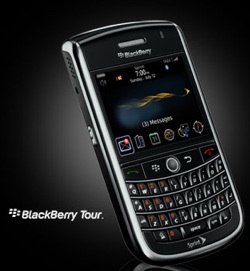
Blackberry TourI have quite a lot of RIM and Blackberry topics swirling around in my head – but those can wait for another day and blog post. I got my Tour a few days ago, and I have to say: I absolutely LOVE it. And though I’ll be the first to admit, I’m a die-hard Crackberry fan, through and through, the device does have some issues (AHEM WI-FI – also, the back is kind of hard to open, I think). However, I really think it’s some much needed love for the CDMA networks, and combines together some great aspects of the Storm, the 8900, and the Bold. It’s definitely an improvement over my 8830, which had seen much better days. It’s nice to have a camera finally, and the speed if phenomenal. I couldn’t have more than a handful of MP3s on my 8830 because the media player was just too slow to categorize. I bought a 16gig micro SD card and loaded that bad-boy up with about 1000 MP3s, and the 9630 didn’t even blink. So sweet.

Any other Tour owners out there, or people hoping to buy the Tour soon? What do you think? Likes, dislikes? What do you think of the keyboard and more recessed trackball?

ALSO, if you haven’t yet, get the beta release of the Blackberry Messenger 5.0 – it’s AWESOME. Avatars, barcode friend adding, proximity to friends, etc. Check out the full details on CrackBerry.com

How Appropriate. You Fight Like a Cow: A Review of Tales of Monkey Island

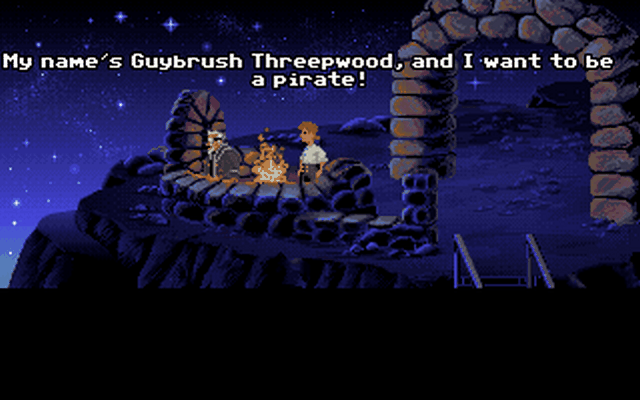
A lengthy title, but one of the most memorable lines from one of the greatest computer games ever created. I speak, of course, of “The Secret of Monkey Island”, a point-and-click adventure released by LucasArts (then Lucasfilm Games) in 1990. For the uninitiated, The Secret of Monkey Island and its 3 subsequent sequels chronicle the adventures of Guybrush Threepwood, a slightly bumbling but well-intentioned swashbuckling neophyte in his quest to become a pirate. The Secret of Monkey Island Along the way he fights the undead pirate LeChuck and marries the beautiful Elaine Marley, governor of Melee Island. If you haven’t played these games, do yourself a major favor and purchase them right away – they are some of the most enjoyable and funny games ever made, thanks for the genius of the game’s original creator, Ron Gilbert.

A New Chapter

Until recently, the last game to come out of the Monkey Island franchise, slightly before LucasArts had decided that adventure games were no longer profitable, was “Escape From Monkey Island” in 2000. Nearly a decade later, many fans had lost hope of there ever being a continuation in the series. There were a few home brew attempts at games, and lots of artwork, fiction, and messages back and forth, but never an official title… Until now.

Telltale Games (My favvvorrite developer), in cooperation with LucasArts, has released the first in a series of 5 episodic games, continuing the Monkey Island saga. I recently completed the first chapter, “Launch of the Screaming Narwhal”, and as a long-time, die-hard fan who has been with the series since the beginning, I can honestly say that this is a gaming dream come true.

A True Return to Monkey Island

Telltale continues to take classic IP and do the job right. We see the full cast of characters return for the new game, with much of the original voice cast, including Dominic Armato as Guybrush Threepwood. The locations and storylines are right on, with LeChuck again causing mayhem upon the seas deep in the Caribbean. Telltale makes use of their “Telltale Tool” and game engine, and I have to say, it looks fantastic. One of the issues I had had with the fourth in the Monkey Island series was a jump to 3D graphics when 3D wasn’t visually there yet. When comparing the beautiful cartoon illustrations of the third game to the blocky, polygons of the fourth, it just seemed ugly. But no longer is this the case – Telltale did another bang-up job and beautifully rendering both the environment and characters.

Tales of Monkey Island
Guybrush Admires Flotsam Island

Look Behind You! A Three-Headed Monkey!

The true test of any adventure game is the puzzles, and in Monkey Island’s case, the laugh factor. Launch of the Screaming Narwhal does a great job at both, though the puzzles are probably easier than the those found in the rest of the series, due to the length of episodic games. I only found myself majorly stuck once, and after taking a night’s break and coming back, I figured it out fairly quickly. I did find myself smiling and laughing quite a bit though, and definitely felt like I was experiencing a true MI game. The jokes were very “Guybrush”, true to his nature.

Issues

One thing a lot of people had moaned and groaned about on the forums was the control scheme. Telltale has chosen to control Guybrush using the Wallace and Gromit scheme, which means use of the keyboard as opposed to clicking for his destination. Many have gone so far as to declare such a control scheme would ruin the game. While everyone is entitled to their opinion, I found this kind of silly, especially since using the keyboard is not that bad, and probably works better considering all the camera movement there is in the game (well done movement). I did notice Telltale added in a secondary control scheme using the mouse to point in the direction you want your character to go, but honestly I preferred the keyboard.

Really, I had no qualms with the game at all, except the ongoing issue of voice volume – for whatever reason, Telltale continually sets their music much too high to make out what is being said during scenes with a musical score. But after a quick re-adjustment to the music volume, all is good again.

Like all TTG productions, I highly suggest you check it out (on PC or Wii), even if you’re new to the series. Need more convincing? Check out the trailer!

Visit Telltale Games!

A Favorite CS Quote of Mine

This past week I’ve been in Chicago (and Indiana for a couple days) having a blast and enjoying a little vacation time – I really enjoy this city. Back to rainy New Hampshire tomorrow – a little sad to leave, but it will be good to be home. In the mean time, I thought I’d share a favorite Computer Science quote of mine by Edsger Dijkstra:

“Computer Science is no more about computers than Astronomy is about telescopes.”

I like this because it’s very true. I often feel that the term “Computer Science” is a very poor term for the field of study, since it’s more the study of mathematics, algorithms, logic, symbols, information processing, etc. If anything, I think the average person probably thinks Computer Science means the study of troubleshooting and fixing computers. Which isn’t necessarily a huge deal, people can think what they want, but a more accurate title for the field might be in order.

Network Any Vintage Computer! (Kind Of)

The idea of computers communicating with each other has fascinated me from the very beginning. When I was little, the world of networking was a “mysterious” one, as I didn’t own a modem until I was 12 and had only experienced the idea of computers talking to each other from TV and movies (read: War Games). When I finally did get my first 2400bps, I got huge into BBSes and ran my own (Pig Pen Forever!), learned everything I could about serial communication and modems. Then when I was older and had access to equipment, I got into Ethernet, TCP/IP, and the wonderful world of modern day networking. But it always goes back to that magic of seeing something pop-up on your screen that didn’t originate from the local machine – it came from somewhere else, either another computer in the room, or half way across the world.

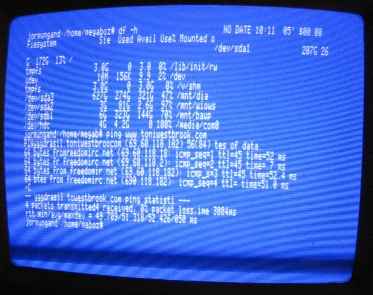
PortServer - ExampleBecause of this, a favorite activity of mine is connecting my vintage machines up in one way or another so they can share data and download programs from the rest of my network. These connections range from a sophisticated TCP/IP stack over Ethernet on my Amiga 4000, to a simpler TCP/IP over PPP over serial on my Apple IIGS, to a very simple Kermit over serial on my Osborne-1.

The Problem With This

With the exception of the Amiga which actually makes use of Ethernet, there are a few issues with this setup – all of which originate from these links being RS-232 serial.

  1. RS-232 is physically point to point, each end needs a dedicated serial port for that connection.
  2. RS-232 is also logically point to point, a device can only directly communicate with the device on the other end of the serial link.
  3. Assuming the computers are DTE devices, a crossover adapter (null modem) needs to be used on the serial connection to flip the send/receive pins.
  4. Serial cables tend to be bulky and expensive, especially when you add in gender changers and null modems. Add a few of them and you have cables everywhere.

A Neat Solution

While the best way to tackle this situation is obtain a native Ethernet network card/adapter for the machine in question, this can be difficult, expensive, or impossible in many cases since for many of the lesser known vintage machines, network cards were simply never made, and there isn’t enough of a community to build one. Luckily though, most vintage machines tend to have serial port – wouldn’t it be great if we could convert that serial port into an Ethernet port? Or even better, include a range of network oriented services integrated into that network port?

Enter the Digi PortServer

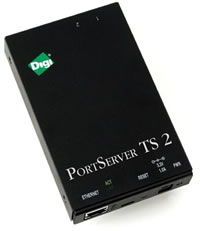
PortServer - PhotoFor the record, I’ll say that I have no affiliation with Digi, I just think they have a really cool product and wanted to share it. Digi produces a line of hardware devices known as the “PortServer” which basically converts a serial port into a network port. What’s better, it can combine multiple serial ports onto a single network connection, so 8 machines can be plugged in over a serial link, which connect to the network via the PortServer only using a single network cable. More importantly, the PortServer supports the following to make networking vintage machines a reality:

  1. Virtual COM/TTY ports – Digi provides drivers that create a virtual COM port on your Windows box (or TTY on your Linux box) which transparently connects over a network to a PortServer serial port. So you can be two countries away, but as far as Windows, your software, and the software sitting on your vintage machine is concerned, you are connected over a hard serial link. This is great for applications made for serial communication that need a com port.
  2. Outgoing TCP connections – The PortServer can be set to automatically connect to an IP and port when serial traffic originates on the vintage computer – e.g. when I open my terminal up on my Apple IIGS, the port server will automatically connect the serial port to a telnet session on my Linux box, or on my favorite BBS.
  3. Incoming TCP connections – The PortServer can listen for connections made on a specific port, and then connect that traffic to the vintage computer – e.g. I can telnet to port 2002 on my PortServer from my Linux box, and it will connect me to the serial port of my Osborne 1. Now you can access your vintage machine from at work!
  4. Modem Emulation – The Port Server can emulate a Hayes compatible modem, while passing traffic via TCP – which means you can run your favorite old BBS like new over telnet without fear of strange compatibility issues or rewriting any code.
  5. PPP – The PortServer supports the PPP protocol, which means if you have a machine capable of speaking PPP (such as an Apple IIGS running Marinetti), your PortServer can take care of handling the PPP traffic. There are configuration options for IP address assignment and negotiation attributes in the PortServer setup.
  6. Chat Mode – The PortServer can also combine multiple sessions together at once, so more than one computer can be connected to your vintage machine at the same time. This can be a good way to monitor traffic or create a shared environment for 2+ person communication.
  7. Lots more – The PortServer also has options for serial printers, industrial applications, power over serial, remote waking, wireless, users and security – the list goes on and on.

I had known that serial IP extenders existed, but when I finally picked up one of the Digi boxes, I was truly amazed by how many options the firmware provides – it’s really impressive.

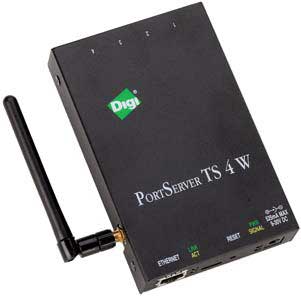
PortServer - Wireless
A 4 port wireless Digi PortServer

It’s Not All Roses

There are a few issues though:

  1. Latency – since the data is being converted from a hardwired RS-232 to packet based back to RS-232, there is definitely an increase in latency, and issues with the network can mean lost or slow data, which isn’t a problem for a direct, hardwired link.
  2. RJ-45 Ports – The PortServers don’t have DB-9 ports, rather RJ-45 ports akin to Cisco or other networking equipment console ports. They understandably do this so any range of converter cables can be used with a wide variety of ends, but in most cases you’ll just want a DB-9. I ordered a two port PortServer and it came with a single RJ-45->DB-9 cable, so I’ll need to get/build another if I want to use the other serial port on the box simultaneously.
  3. Price – They can get a bit expensive. A two porter can go anywhere from $250-$340 depending on the options it’s equipped with. Also available are 4 port, 8 port, and 16 serial port models, the latter which gets close to $1200. However, depending on how many machines you actively would like “networked”, 2-4 would probably suit most peoples’ needs – I know I’ll be fine with 2.

The Sky’s the Limit

I’ve only had mine hooked up for the last few hours, and already I’m thinking about a dozen uses for this thing. And while it isn’t a miracle product for anything modern that features a network jack – it is an amazing buddy for vintage computers in need of network communication.

Well, I’m off to surf some BBSes on my Osborne-1!

Digi Official Website