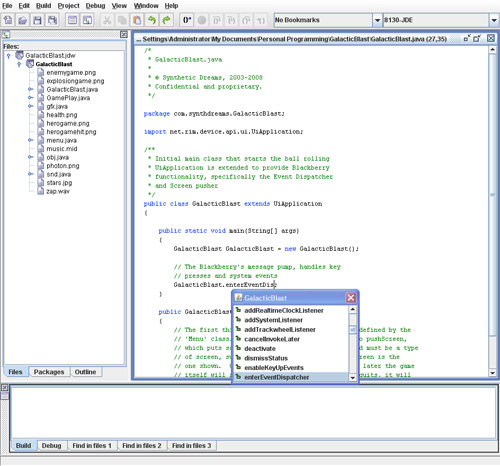
GalacticBlast.java
package com.synthdreams.GalacticBlast;

import net.rim.device.api.ui.UiApplication;

/**
 * Initial main class that starts the ball rolling
 * UiApplication is extended to provide Blackberry
 * functionality, specifically the Event Dispatcher
 * and Screen pusher
 */
public class GalacticBlast extends UiApplication
{

    public static void main(String[] args)
    {
        GalacticBlast GalacticBlast = new GalacticBlast();

        // The Blackberry's message pump, handles key
        // presses and system events
        GalacticBlast.enterEventDispatcher();
    }

    public GalacticBlast()
    {
        // The first thing we do is show the menu screen, defined by the
        // 'Menu' class.  We accomplish this with a call to pushScreen,
        // which puts screens on the stack (Class specified must be a type
        // of screen, such as MainScreen).  The top most screen is the
        // one shown.  Our first one will be the menu, and later the game
        // itself will sit on top of this.  When the game quits, it will
        // pop that screen off the stack and return to the menu screen.
        pushScreen(new Menu());
    }
}
Nothing major going on there, simply a place to get started. As we can see, things are immediately handed off to our Menu class, which handles the main menu. It is common functionality to have a main menu where the player can play, save, load, configure, quit, etc.
The Main Menu
Our main menu extends MainScreen, as I wanted just a simple screen with text and buttons, using the built in Blackberry look and feel. However, there is nothing stopping you from using the techniques in the actual gameplay section for displaying more advanced graphics in the menu section. But for this tutorial we have a simple main menu.
The concept behind Blackberry forms is there is a layout manager that occupies a certain amount of screen space, and contains fields that it positions accordingly. You can have multiple layout managers on one screen, each with its own child fields. There are different built in layout managers, and you can make your own custom ones as well. For our main menu, we’ll both use the default built in manager that simply repeats fields in the vertical direction, as well as a custom manager that allows us to specify the exact X,Y coordinates of fields within the layout manager.
Additionally, we’ll be making a special start button that will start the game play by instantiating the Gameplay class and pushing it onto the screen stack (just like our initial class pushed our Menu class onto the screen stack). Also check out our custom fields and field manager that allow us to position fields specifically by X and Y coordinate. Our field manager allows us to specify its height, so we can use it as a simple vertical-space buffer as well.
Menu.java
package com.synthdreams.GalacticBlast;

import net.rim.device.api.ui.*;
import net.rim.device.api.ui.component.*;
import net.rim.device.api.ui.container.*;

/**
 * The menu class handles showing the main menu and intercepting when the user quits or
 * begins the game.  If the user presses the button to begin, the Menu class starts
 * the game going.
 */

class Menu extends MainScreen
{
    GamePlay _game;  // GamePlay handles the action part of the game itself
    int _invokeID; // A handle to our invocation of scanning for when the game ends

    // To add functionality to clicking the button, we need to override the button's
    // trackwheelClick method.  Here we define _startButton as a button with
    // text, positioning, and trackwheelClick we want.
    ButtonField _startButton = new ButtonField("Start Game!", ButtonField.FIELD_HCENTER | ButtonField.FIELD_BOTTOM)
    {

       protected boolean trackwheelClick(int status, int time)
       {
          // If the button is pressed, we create a new GamePlay object
          _game = new GamePlay();

          // Then we push it onto the screen stack.  This then becomes the
          // active screen.  See GalacticBlast.java for notes about pushing
          // screens onto the stack
          getUiEngine().pushScreen(_game);

          // The invokeLater method allows us to continually run a segment of
          // code from outside the GamePlay object.  In this case, we do
          // this to monitor if the gameplay object is active our not.
          // When the player loses, the object marks itself inactive, at
          // which point we first cancel invoking further, then stop
          // the music from playing, then pop the gameplay screen off
          // the stack so we return to the main menu.
          _invokeID = getApplication().invokeLater(new Runnable()
            {
                public void run()
                {
                    // Check to see if the game is done.
                    if (_game.getActive() == false)
                    {
                        // Cancel invoking this piece of code again (normally is invoked
                        // every 500 ms, as specified below)
                        getApplication().cancelInvokeLater(_invokeID);

                        // Kill the music
                        GamePlay.snd.stopMusic();

                        // Pop the gameplay screen off the stack, which returns
                        // the user to the main menu
                        getUiEngine().popScreen(_game);

                        // Display the final score
                        Dialog.inform("Final Score: " + _game.getScore());

                        // We're done with our game object now
                        _game = null;
                    }
                }
            }
            , 500,true); // rerun this code every 500ms

          return true;
       }
    };

    // Normally LabelFields are arranged in a very plain order depending on the
    // Layout manager.  They'll repeat vertically with the option of left/center/right
    // justifying.  But sometimes it's nice to be able to specificy exactly in X,Y coordinates
    // where you want the field to go.  This class, in conjunction with the Custom Manager
    // defined below, allows for this
    // Additionally, a "customStyle" is defined for the field.  For our cases, this
    // is either left to 0 for normal X,Y positioning, set to 1 for X set to 1/8th the total
    // width of the screen, or set to 2 for X+fieldwidth set to 7/8th the total width of the screen.
    // 1/8th and 7/8th for the edge of the text allows for columns to be made, for scores,
    // instructions, or anything else.  More custom centering or something more dynamic
    // could be done with this variable, but its fine for our purposes right now.
    class CustomTextField extends LabelField
    {
       int _xPos, _yPos, _customStyle; // coordinates and style

       // We pass in the coordinates and the custom style
       CustomTextField(String passLabel, int passStyle, int passX, int passY)
       {
              super(passLabel);
              _xPos = passX;
              _yPos = passY;
              _customStyle = passStyle;
       }

       // Getters for position and style
       int getX() { return _xPos; }
       int getY() { return _yPos; }
       int getCustomStyle() { return _customStyle; }
    }

    // Our custom manager is where the magic happens for allowing customtextfields
    // to be placed at any X,Y coordinate.  It reads in the coordinates from the
    // field and places it at those coordinates in the layout.  It will also
    // look at custom layout, and if centered is specified, will ignore the X coordinate
    // and center it at the Y coordinate on the screen.  Additionally, the total height
    // of the manager can be control how much space it takes up regardless of how many
    // fields it contains
    class CustomManager extends Manager
    {
        int _managerHeight; // Total height of the manager

        // Pass in desired height.  Scrolling is turned off in both directions.
        public CustomManager(int passHeight)
        {
            super(Manager.NO_HORIZONTAL_SCROLL | Manager.NO_VERTICAL_SCROLL);
            _managerHeight = passHeight;
        }

        // Sublayout is called automatically to position all the internal fields to this
        // layout.  Its sublayouts job to read in the custom coordinates of each of the fields
        // and place them accordingly.
        protected void sublayout(int width, int height)
        {
            CustomTextField field;

            // Loop through all the fields contained with the layout manager
            for (int lcv = 0; lcv < getFieldCount(); lcv++)
            {
                //Get the field.
                field = (CustomTextField)getField(lcv);

                //Obtain the custom x and y coordinates for
                //the field and set the position for
                //the field.
                switch (field.getCustomStyle())
                {
                   // Custom style 1 is for the left side of the text to be at 1/8th the width
                   // of the screen
                   case 1:
                        setPositionChild(field, width / 8 , field.getY());
                        break;

                   // Custom style 2 is for the right side of the text to be at 7/8ths the width
                   // of the screen
                   case 2:
                        setPositionChild(field, width * 7 / 8 - field.getPreferredWidth(), field.getY());
                        break;

                   // Any other custom style gets position strictly from X,Y
                   default:
                        setPositionChild(field, field.getX(), field.getY());

                }


                 //Layout the field.
                 layoutChild(field, width, height);
            }

            //Set the manager's dimensions
            setExtent(width, _managerHeight);
        }

        public int getPreferredWidth()
        {
            return Graphics.getScreenWidth();
        }

        public int getPreferredHeight()
        {
            return Graphics.getScreenHeight();
        }
    }

    // Menu constructor
    public Menu()
    {
        // First, turn off scroll bars for this screen in case we accidentally push past the
        // edge with our fields/whitespace
        super(NO_VERTICAL_SCROLL);

        // We set the title on the screen
        LabelField title = new LabelField("Galactic Blast Demo", LabelField.FIELD_HCENTER);
        setTitle(title);

        // CustomManagers can also be used just as space buffers.  First we make
        // 20 pixels of space
        getScreen().add(new CustomManager(20));

        // Add some text
        add(new LabelField("Instructions", LabelField.FIELD_HCENTER));

        // Create another custom manager, but this one we'll use for more than just
        // spacing, we'll actually position some text fields (our instructions)
        CustomManager instManager = new CustomManager(Graphics.getScreenHeight() - 145);
        getScreen().add(instManager);

        // A multi-d array that will store our instruction fields
        CustomTextField instArray[][] = new CustomTextField[3][2];

        instArray[0][0]= new CustomTextField("Trackball", 1, 0, 20);
        instArray[1][0] = new CustomTextField("Space", 1, 0, 40);
        instArray[2][0] = new CustomTextField("Escape", 1, 0, 60);
        instArray[0][1] = new CustomTextField("Move Ship", 2, 0, 20);
        instArray[1][1] = new CustomTextField("Fire Cannon", 2, 0, 40);
        instArray[2][1] = new CustomTextField("Quit Game", 2, 0, 60);

        // Loop through our array and add each field to the layout manager with a different
        // font
        for (int lcv = 0 ; lcv < 3 * 2 ; lcv++)
        {
            instArray[lcv%3][lcv/3].setFont(Font.getDefault().derive(Font.PLAIN, 16));
            instManager.add(instArray[lcv%3][lcv/3]);
        }

        // add our button that has the click method overridden
        add(_startButton);

        // Add a buffer of 10 pixels
        getScreen().add(new CustomManager(10));

        // More text
        LabelField copyrightText = new LabelField("Copyright 2008 Synthetic Dreams", LabelField.FIELD_HCENTER);
        copyrightText.setFont(Font.getDefault().derive(Font.ITALIC, 14));
        add(copyrightText);

    }

}
At this point, your program should be able to load with a menu screen (well, you’ll have to comment out any mentions of other undefined classes). You should see something like this:

Only with your own text, of course. Now onto Part 3…